


TezLab
4.6267.00 Reviews
App Specs
- Version
- 2026.17
- Updated On
- License
- Free
- Downloads
- 50,000+
- Developer
- Brooklyn Running LLC
- Categories
- Auto & Vehicles
- Platform
- Android
Screenshots
 Analysis by AppCompare
Before adding another dashboard to my phone, I’d ask one practical question: do I want a deeper view of my EV, or do I just need the essentials to get from one place to another? TezLab is aimed at drivers who enjoy understanding their car’s day-to-day behavior, not only checking a single status screen. I find that distinction useful when deciding whether a companion app will become part of my routine or just add another icon I rarely open.
Decide what you want from an EV companion
For a Tesla owner, the choice is less about replacing the basic ability to use the car and more about how much context is helpful. Some drivers want a quick glance at vehicle status and little else. Others like reviewing how a commute affected energy use, comparing one trip with another, or seeing patterns in their charging habits. TezLab makes more sense for the second group, especially if those details help you make small practical changes.
I would also think about how often you charge away from home and whether you enjoy community features. A driver who regularly plans longer journeys may value a dedicated charging-planning tool more than trip analysis or social comparison. Someone who mostly follows a familiar daily route may find the analytics more interesting than a map of charging stops. There is no need to use every part of an app like this; it is more useful when one or two features solve a real problem for you.
Where it can add useful context
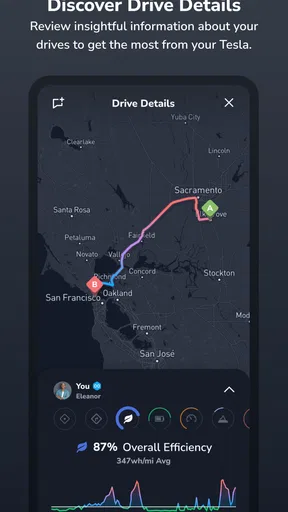
The strongest reason I’d give it a try is the way trip information can turn vague impressions into something you can review. If a regular commute seems to use more energy than expected, comparing trips can help you notice when conditions or driving habits might be contributing. That does not mean the app can explain every change on its own, but having a record gives you a better starting point than relying on memory.
A useful habit is to compare similar journeys rather than treating every drive as a fair test. A short errand, a longer highway run, and a cold morning commute are different situations. Looking at them separately can keep an unusual trip from distorting your sense of what is normal. This is one of the more practical ways to use trip analytics: not as a scorecard for every drive, but as a way to spot patterns worth paying attention to.
The social side may suit people who enjoy sharing an interest in EV ownership. Efficiency comparisons can be motivating, but I would treat them as conversation and friendly competition rather than a strict measure of driving skill. Routes and conditions differ, so a leaderboard cannot make every comparison perfectly fair. If seeing other owners’ experiences encourages you to explore your own numbers, it can be a pleasant extra; if you prefer a private, uncluttered tool, it may matter much less.
In a normal week, I can imagine checking a trip after a familiar commute, then looking at the charging history before deciding whether a change to my routine is worthwhile. For example, if I have been charging at different times or places, reviewing those sessions could help me remember what worked best. The value is not that the app makes the decision for me; it is that it gives me a more organized view of details I might otherwise forget.
Worth Reading Before You Choose

Flipboard Shows What News Apps Must Do Beyond the Feed

Switching to Android Auto Means Rethinking Your Driving Routine

Google Calendar Makes a Crowded Week Easier to Manage

Ludo King Makes the Most of the Minutes Between Plans

Baby Panda World Brings Quick Play to Modern Phones, but Its Game Library Feels Busy

ESPN’s Live Game View Makes Following Close Games Easier
Getting Started with TezLab
First things first, downloading and setting up TezLab is a breeze. Available on both Android and iOS, installing it felt like getting a new gadget for my car. Once you log in with your Tesla account, the app quickly pulls in all the essential data from your vehicle. It’s like opening a treasure chest of insights about your car’s performance, battery health, and driving habits.
Features That Drive You Forward
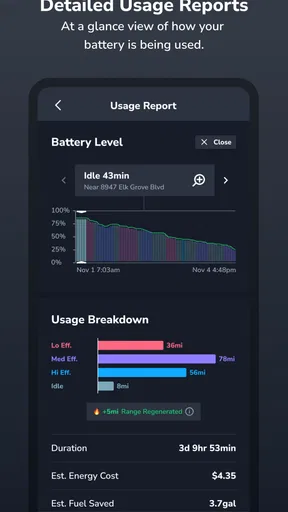
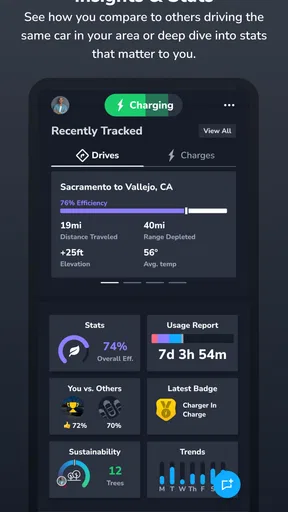
TezLab offers a plethora of features, enough to make any Tesla owner giddy with excitement. One of my favorites has to be the trip analytics. Every time I hit the road, I can dive into detailed reports on energy consumption, efficiency, and cost. It’s like having a personal energy advisor riding shotgun, always looking out for my driving style.
Then there’s the community aspect. TezLab lets you connect with other Tesla owners, share experiences, and even compete on efficiency scores. It’s like social media but for car enthusiasts. I found myself checking the leaderboards more often than I’d like to admit!
Stay Charged Up
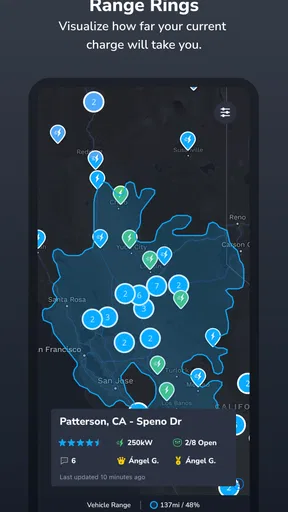
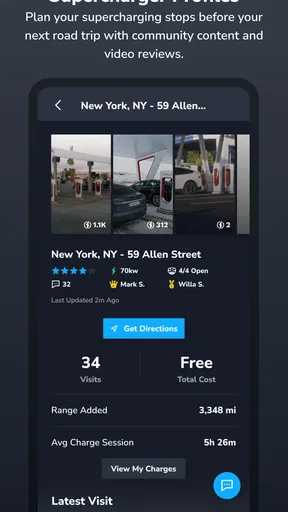
Charging is a big part of owning an electric vehicle, and TezLab doesn’t disappoint here. The app shows nearby charging stations, complete with real-time availability and user reviews. Planning a road trip? It’s as simple as plotting your stops and letting TezLab guide you to each charging spot. Plus, you get detailed insights into your charging habits. Who knew watching your car juice up could be so fascinating?
For a longer drive, I would still check the route and charging information before setting off rather than treating any single app as the only source I need. A station’s status can change, and a user review is useful context rather than a guarantee of what I will find on arrival. I’d use the nearby-station view to shortlist options, then keep a backup stop in mind if the journey depends on charging at a particular point. That small bit of planning matters more when I am travelling somewhere unfamiliar than on a route I already know.
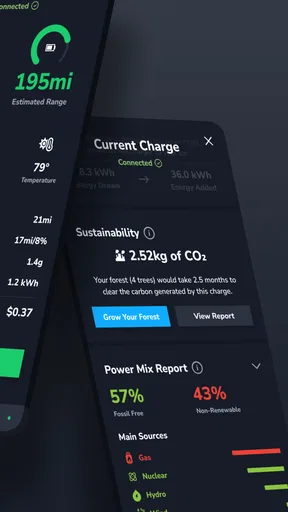
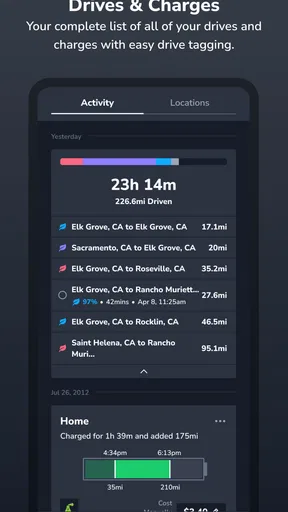
Charging insights can also be more useful when I review them with a clear question in mind. Am I trying to understand how often I rely on public charging, or simply remember which sessions belong to a particular stretch of travel? Looking at a handful of relevant sessions is likely to tell me more than checking every entry without a purpose. That keeps the feature practical rather than turning charging into another stream of numbers to monitor.
Sleek Design Meets User-Friendly Interface
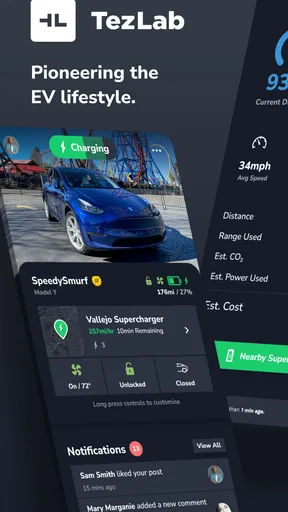
Let’s talk about the app’s design. TezLab sports a clean, modern interface that’s intuitive and easy to navigate. The dashboard is customizable, allowing you to focus on the metrics that matter most to you. Whether you’re a data junkie or just want quick access to your car’s stats, TezLab has you covered.
My tip would be to make the dashboard serve a specific routine instead of trying to display everything at once. If I mostly want a quick check before leaving, I would put the status information I care about within easy reach. If I am reviewing efficiency later, I can spend time in the trip details then. Separating those two jobs can make an information-rich app feel less busy and reduce the temptation to inspect every metric during a day when nothing needs attention.
Notifications are also a big win. I get alerts for everything from software updates to car status changes. It’s like having a personal assistant keeping tabs on my Tesla, ensuring I never miss a beat.
At the same time, notifications are only helpful when they match what I actually want to know. I would review them after setup and keep the alerts that support a real habit, rather than letting every change interrupt the day. That is a small but worthwhile adjustment for anyone who likes the app’s monitoring role but does not want their phone to become a constant stream of vehicle updates.
How it compares with other ways to manage an EV
The usual alternative is to rely on the vehicle’s own tools for routine checks and add another app only when a particular need comes up. That approach is simpler and may be enough for a driver who rarely looks back at trip or charging history. TezLab’s appeal is the combination of vehicle-focused information, trip review, charging context, and a community element in one place. I would choose it when those pieces are useful together, not merely because more screens or numbers sound impressive.
A dedicated route or charging planner may be a better fit for someone whose main concern is planning a complicated journey. Likewise, a driver who wants no social layer may prefer a more narrowly focused utility. These are not reasons to dismiss TezLab; they are reasons to be honest about the job I want the app to do. If my priority is understanding everyday use and having a shared space with other Tesla drivers, its broader mix is a stronger match.
There is also a small cost of switching in attention and habit. Even if setup is straightforward, I still need to decide which dashboard details matter, how much I want to review, and whether I want alerts. If I already have a routine that works, I would begin with one clear use—such as checking trip patterns for a regular commute—before making the app part of every vehicle task. That makes it easier to judge whether it adds enough value to keep using.
Who should use it, and who may prefer something else
Brooklyn Running LLC makes this free Auto & Vehicles app for a broad audience: its age rating is Everyone, and its current version is 2026.7. It has a 4.6 average from around 3.9 thousand ratings, with over 50 thousand installs. Those figures suggest that it has found an audience, but they do not tell me whether its mix of analytics and community will suit a particular driver. I would focus on whether I will actually use those tools.
It is a particularly natural fit for Tesla owners who like tracking patterns, comparing trips, or talking with other EV drivers. It is less compelling for someone who only wants the basics, dislikes reviewing driving data, or would rather keep vehicle tasks inside a single familiar interface. Drivers of other electric vehicles should not assume it is a general-purpose companion for every brand; its identity and features are centered on Tesla ownership.
The app is free to download, with in-app purchases ranging from $6.99 to $59.99 per item. I would explore the free experience first and decide what I would genuinely use before paying for anything. That is a sensible way to avoid spending on extras simply because they are available, especially if my interest is limited to occasional trip checks rather than frequent analysis.
Why TezLab is a Must-Have
In my opinion, TezLab is a must-have for any Tesla owner. Not only does it enhance the driving experience, but it also builds a sense of community among Tesla enthusiasts. It’s more than just an app; it’s a companion that adds value to every drive.
While the app is packed with features, it’s the little things that make it stand out. From tracking your car’s location to unlocking doors remotely, TezLab offers convenience at your fingertips. And with continuous updates, there’s always something new to explore.
I would describe it as a strong optional companion rather than an essential tool for every owner. Its most convincing value comes when I return to it: checking a pattern, reviewing a trip, or using the community to add perspective to my own EV experience. If I open it only once and never make those habits part of my routine, the extra detail may not justify keeping another app in regular rotation.
In conclusion, if you own a Tesla and haven’t tried TezLab yet, what are you waiting for? It’s an essential tool that elevates your vehicle’s capabilities and connects you with like-minded drivers. So go ahead, download TezLab and take your Tesla experience to the next level. You’ll wonder how you ever lived without it!
Pros
- User-friendly interface simplifies navigation.
- Real-time data enhances driving efficiency.
- Community features foster user interaction.
- Customizable notifications for key events.
- Integration with smart home devices.
Cons
- Some features require a premium subscription.
- Battery usage can be relatively high.
- Limited support for non-Tesla vehicles.
- Occasional data syncing issues reported.
- May overwhelm new users with data.
FAQs for TezLab
What is TezLab and how does it work?
TezLab is an app designed for Tesla owners, offering a comprehensive suite of tools to monitor and enhance their driving experience. It connects to your Tesla vehicle to provide insights on battery usage, driving efficiency, and overall performance. By leveraging real-time data, TezLab helps users optimize their vehicle's capabilities.
Is TezLab compatible with all Tesla models?
Yes, TezLab is compatible with all Tesla models, including the Model S, Model 3, Model X, and Model Y. The app is designed to support the unique features of each model, ensuring that all Tesla owners can benefit from its functionalities, regardless of their specific vehicle.
Does TezLab require a subscription or is it free to use?
TezLab offers a free version with basic features and a premium subscription for advanced functionalities. The premium version includes detailed analytics, enhanced tracking, and exclusive features not available in the free version. Users can choose the plan that best suits their needs and preferences.
How does TezLab ensure the privacy and security of my data?
TezLab prioritizes user privacy and employs robust security measures to protect your data. The app uses encryption to secure information and adheres to strict privacy policies. Users have control over their data and can manage what information is shared within the app's settings.
What unique features does TezLab offer that other Tesla apps do not?
TezLab stands out with its community-driven features, allowing users to connect with other Tesla owners. It offers leaderboards, social challenges, and events to enhance the driving experience. Additionally, TezLab provides in-depth analytics and real-time tracking that are not commonly found in other Tesla apps.


